Read more...Photograph by Elia Locardi of the valley in Meteora, Greece. Shot in raw on a Fuji XT-2 and edited on location with an iPad Pro with Lightroom for iOS.
Lightroom for iOS 2.4
In version 2.4, two major improvements have been added: a raw technology preview and the addition of local adjustment tools. In addition to these major improvements, we’ve also added the ability to use keyboard shortcuts with physical keyboards connected to iPads, the ability to add your copyright to all imported photos, functionality to turn on lens profiles (if your camera and lens combination are supported), as well as the usual bug fixes and improvements.
Showing posts with label mobile. Show all posts
Showing posts with label mobile. Show all posts
Saturday, December 31, 2016
Kaspersky Mobile Security 9 for Android and Blackberry antivirus for the smartphone
Kaspersky Mobile Security 9 for Android and Blackberry antivirus for the smartphone
 The smartphone needs antivirus as well, at least that’s what Kaspersky is claiming and charging $30 per year for the use of the application that purports to be an all inclusive security solution for the mobile OS.
The rise of the smartphones also has disadvantages: in recent years, smartphones, their applications, browsers and processors become no less powerful than our PC’s, and are used for tasks and assignments. If there’s one thing PC’s are characterized with (especially those running Windows) its security breaches. Viruses, malware and Trojan horses are terms that still bring fear into users hearts and force them to use an effective antivirus, like Kaspersky – a veteran in the arena of PC antivirus.
Kaspersky Mobile Security is the company’s product that purports to provide a collection of tools to maintain privacy and security on our smartphone. This is not just an antivirus but an entire package that contains firewall, tools to fight theft of loss of the device, call filter and more. Version 9 that was issued in the beginning of the year with support to Windows Mobile and Symbian received a significant update that added support to Android (versions 1.6 to 2.2) and Blackberry (versions 4.5 to 6.0) but not the new Windows Phone 7 by Microsoft.
Unlike other solutions for the Blackberry and Android that exist on the market, Kaspersky doesn’t have a free version for the application and the application is offered at a license limited to one device at a relatively higher price than common in the smartphones market. In order to gain access to the application in any of the four supported OS you’ll have to part with $29.95 per year. A trial period of one week is available after which you’ll have to decide whether you want to continue.
The application’s installation is a little complicated because it is not done through the Android Market or Blackberry application store but by entering Kaspersky’s website and downloading an outside file. On the Android you’ll have to enable the download of an application from an unknown origin and then follow the instructions. On the Blackberry you’ll have to authorize a series of authorizations for the application during the installation.
Available link for download

Saturday, December 10, 2016
Kumpulan MDMA Mobile Data Monitoring Aplication
Kumpulan MDMA Mobile Data Monitoring Aplication
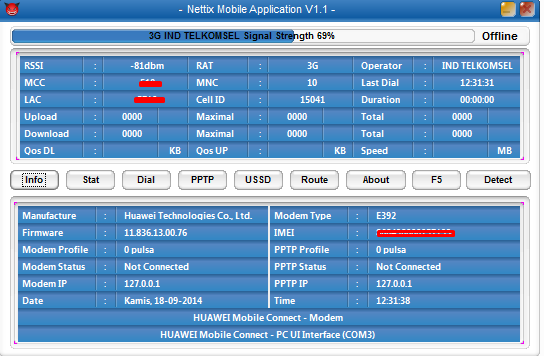
MDMA singkatan dari Mobile Data Monitoring Aplication adalah sebuah aplikasi portable ( tanpa harus diinstal ) sebagai pengganti aplikasi bawaan modem ( biasanya mobile partnet ) yang lebih ringkas dan simple digunakan.MDMA bukan aplikasi yang bisa untuk meningkatkan kecepatan internet namun sesuai namanaya MDMA lebih pada menampilkan data data yang lebih akurat dan simple sehingga kita bisa memonitor internet yang kita pakai,dahulu mungkin banyak beredar trik meningkatkan kecepatan internet dengan loncat kodot yaitu memindahkan jaringan dari EDGE ke 3G,kebanyakan modem yang bisa memakai atau suport MDMA adalah modem GSM merk huawei tapi tidak semua modem GSM huawei bisa menggunakan MDMA
Fitur fitur aplikasi MDMA anatara lain :
-Bisa menambahkan atau mengganti APN dengan cepat
-Bisa memindahkan sinyal EDGE ke 3G atau sebaliknya dengan cepat atau sering disebut loncat kodok
-Bisa USSD dial atau cek saldo,cek pulsa,cek paket internet dan lain sebagainya
-Bisa cek sinyal secara tepat karena menampilkan angka digital bukan baris seperti pada aplikasi bawaan modem atau mobile partner
-Bisa menampilkan jenis sinyal yang diterima ( GPRS,EDGE,3G,HSDPA )
-Bisa menampilkan kode lokasi BTS operator seluler yang digunakan
dan banyak fitur lainnya.
Sumber : http://anyarcelltasik.blogspot.com
Buat yang butuh MDMA silahkan download di bawah ini
mdma1101b3

MMD X (Final)

MMD X (Return)

MMDv1.4

WBNC_MDMA
IP connection viewer

Available link for download
Tuesday, November 15, 2016
LG Mobile Support Tool Free by Mina Telecom
LG Mobile Support Tool Free by Mina Telecom
LG Mobile Support Tool Free by Mina Telecom

B2cAppSetup
DOWNLOAD HERE
LG Mobile Support Tool Free by Mina Telecom

Available link for download
Tuesday, November 8, 2016
Lightroom for Mobile July Releases
Lightroom for Mobile July Releases
You can read the full news release at the Adobe Lightroom Blog website
http://blogs.adobe.com/lightroomjournal/2016/07/lightroom-mobile-july-updates.html
Two big updates for Lightroom for mobile are now available for download: Lightroom for iOS 2.4 and Lightroom for Android 2.1.

Available link for download
Tuesday, November 1, 2016
Killer Mobile Advance SMS V 1 5 0 S60 V3 V5 Full Unsigned Hide Your Private Incoming Private Message Notification on Your S60
Killer Mobile Advance SMS V 1 5 0 S60 V3 V5 Full Unsigned Hide Your Private Incoming Private Message Notification on Your S60
credit : diL
ADVANCE SMS V 1.5.0

Killer Mobile Advance SMS adalah aplikasi yang memiliki kemampuan untuk menyembunyikan notofikasi pesan singkat (SMS) yang masuk ke ponsel. Dengan aplikasi ini, kamu bisa mengatur nomor-nomor yang ada di phonebook kamu supaya SMS yang masuk dari nomor yang sudah diatur sebelumnya, menjadi private.
Artinya, SMS dari nomor-nomor tersebut tidak akan ada yang tahu, karena nada SMS sampai konten yang masuk tidak ada pemberitahuannya. Indikator yang posisinya berada di pojok kanan atas layar lah yang menjadi private notification dan untuk membukanya, hanya kamu yang mengetahui kata sandinya 
- Sembunyikan nada pesan dan SMS yang masuk ke ponsel.
- Password protected.
- Schedule SMS, membuat rencana SMS yang akan dikirim dengan mengatut tanggal, waktu dan nomor tujuan.
advance sms 01

- Menambah lebih dari satu nomor di phonebook.
- Add number : from contacts, enter manually, private number, phonelog.
- Add number : person, group, all non-contacts.
advance sms 02

- Enabled/disabled filter SMS.
- Forward if filtered, meneruskan pesan singkat ke nomor pengirim.
- Auto reply, atur sebelumnya konten SMS yang akan menjadi pesan balasa secara otomatis.
- Auto reply frequency : daily once, every time.
- Enabled/disabled SMS tone.
- Mengatur SMS tone untuk tiap nomor yang sudah diatur sebelumnya.
- Filter rules, mengatur hari untuk aktivasi Advance SMS.
advance sms 03

- Auto start.
- Log duration setting : 1 day, 10 day, 30 day, no log.
- Enabled/disabled unread SMS alert.
- Unread interval, mengatur jumlah pesan private yang masuk.
- Status indicator, icon Advance SMS di pojok kanan atas layar sebagai notifikasi.
- SMS forward number, mengatur nomor tujuan untuk menerima terusan SMS dari Advance SMS.
- SMS forward email.
- Fullscreen message with time out, menampilkan preview SMS yang diterima.
advance sms 04

- SMS logs, tempat SMS private yang masuk.
- Restore message to general inbox.
advance sms 05

- Export SMS, inbos message, sent message. Data back-up SMS ada di C:Data/ dengan format file .csv.
advance sms 06

- Smooth scroling.
- Full version, no registration (thanks to diL).
advance sms 07

Cara pengoperasian Advance SMS :
- Buka Advance SMS.
- Buka opdi Manage SMS.
- Pilih Options dan masukkan nomor yang kamu kehendaki dengan memilih beberapa opsi : Add number, add person, add group, dan add all non-contacts.
- Setelah (1 atau lebih) nomor yang dikehendaki sudah masuk ke list, pilih nomor-nomor tersebut untuk pengaturan lebih lanjut (preference settings).
- Di dalamnya terdapat banyak, dan atur opsi-opsi tersebut sesuai kehendak kamu.
- Pilih auto reply, untuk mengaktifkan SMS balasan ke nomor tersebut dengan mengisi konten SMS di opsi Auto reply text.
- Pilih Disable di opsi Play SMS tone untuk menghilangkan nada SMS.
- Setelah pengaturan selesai, kembali ke halaman muka Advance SMS.
- Tekan Hide" untuk mengaktifkan Advance SMS bekerja di belakang layar (running in background).
Download Killer Mobile Advance SMS V 1.5.0 Full Unsigned
Available link for download
Subscribe to:
Posts (Atom)